
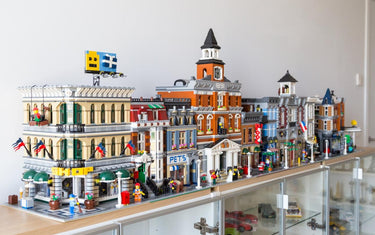
Building a LEGO® Modular Buildings collection is more than just collecting individual sets. For many enthusiasts, the real excitement comes from connecting different buildings and creating a miniature city filled with shops, restaurants, museums, and streets.
But as your collection grows, finding the right way to display everything becomes increasingly challenging. Limited shelf space, different building sizes, dust accumulation, and the need to accommodate future releases can all make LEGO city planning difficult.
So, how do you display LEGO Modular Buildings in a way that looks organized while making every building stand out?
In this guide, we'll explore practical LEGO Modular Buildings display ideas, creative city layouts, space-saving solutions, and acrylic display options to help you build the ultimate LEGO City collection.
1. What Makes LEGO Modular Buildings Special?
LEGO Modular Buildings are designed to create detailed miniature city environments. Each building typically features realistic architectural details, furnished interiors, sidewalks, and removable building sections.
One of the biggest attractions is their modular design. Individual buildings can be displayed separately or connected to create larger streets and neighborhoods.
Popular examples include:
-
LEGO Natural History Museum (10326)
-
LEGO Tudor Corner (10350)
-
LEGO Shopping Street (11371)
-
LEGO Boutique Hotel (10297)
-
LEGO Jazz Club (10312)
-
LEGO Assembly Square (10255)
Each building has its own architectural personality, making a growing collection visually interesting.
According to the official LEGO Modular Buildings collection, these sets are designed to help builders create their own expanding city environments.
For collectors, this creates an interesting challenge: how do you arrange multiple buildings so they look like one cohesive city rather than a collection of unrelated models?
2. Create a LEGO City with a Straight Street Layout

One of the most popular LEGO Modular Buildings display ideas is a traditional straight-street arrangement.
Place your modular buildings side by side to create a continuous city street. This layout works particularly well for collectors who own several buildings with different architectural styles.
For example, you could combine:
-
A LEGO Shopping Street
-
A LEGO Natural History Museum
-
A LEGO Tudor Corner
-
A LEGO Boutique Hotel
The result is a miniature neighborhood with different architectural styles and storefronts.
Why Choose This Layout?
A straight street makes it easy to view the entire collection from the front. It also creates a consistent visual line, making the buildings look like part of a real city.
Space Planning Tip:
Measure the combined width of your buildings before choosing a shelf or cabinet. Remember to leave additional room for sidewalks, lighting cables, and future additions.
3. Try an L-Shaped or Corner LEGO City Layout

If you don't have enough wall length for a straight street, an L-shaped arrangement is another excellent option.
Place corner buildings at the intersection and arrange additional modular buildings along both sides.
This creates a more realistic city layout and makes better use of room corners.
An L-shaped display is especially useful for collectors who want to create:
-
A busy shopping district
-
A historic neighborhood
-
A city center with different building styles
-
A compact LEGO street scene
You can also introduce small vehicles, streetlights, and minifigures to make the city feel more alive.
Collector Tip: Keep the most detailed or visually striking buildings near the corner or at the center of the display. This creates a natural focal point.
4. Use Display Shelves to Maximize Your LEGO City Space

As your LEGO Modular Buildings collection grows, ordinary furniture may not provide enough flexibility.
A dedicated display area can help you organize buildings while making better use of available room space.
Here are three popular options.
Deep Display Shelves
Large modular buildings need sufficient depth and width. Choose sturdy shelves that can support the combined weight of your completed models.
Before purchasing furniture, measure the footprint of each building and compare it with the usable shelf dimensions.
Multi-Level Display Cabinets
If floor space is limited, consider a multi-level cabinet.
Different shelves can accommodate different architectural themes, allowing you to organize your LEGO City collection vertically.
Make sure every level has enough clearance for the tallest buildings and removable roof sections.
Floating Wall Shelves
Floating shelves can help transform unused wall space into a display area.
They are particularly useful for smaller LEGO builds, minifigures, accessories, and compact collectibles.
For full-size modular buildings, however, always check the shelf's actual dimensions, load capacity, mounting method, and wall compatibility before installation.
ICUANUTY offers Floating Wall Shelves for Building Bricks, providing a modular approach to arranging smaller brick-built creations.
5. Protect Your LEGO Modular Buildings with Acrylic Display Cases
One challenge that almost every LEGO collector eventually faces is dust.
Modular buildings often feature intricate facades, decorative windows, balconies, roof details, and furnished interiors. Cleaning these areas individually can be time-consuming.
An acrylic display case provides a practical way to showcase completed buildings while reducing everyday dust exposure and accidental contact.
Why Choose an Acrylic Display Case?
Clear Visibility
High-transparency acrylic panels allow you to appreciate the architectural details without hiding the model behind opaque materials.
Dust Protection
An enclosed display creates a physical barrier that helps reduce dust reaching the model.
Dedicated Presentation
A purpose-designed case gives each building a defined display area and can make it look more like a collectible centerpiece.
Background Options
A printed background can complement the building's architectural style and create a more distinctive presentation.
Displaying LEGO Venetian Neighborhood 11388

The LEGO Icons Venetian Neighborhood 11388 is an excellent example of a detailed architectural model that deserves a dedicated display arrangement.
Inspired by Venice, its buildings, canal scenery, and bridge details create a miniature European streetscape.
For collectors who want to showcase this model separately, ICUANUTY offers a dedicated acrylic display case.
Explore the ICUANUTY Acrylic Display Case for LEGO Icons Venetian Neighborhood 11388.
The case is designed specifically for this set and offers transparent and background configurations.
It is a useful option for collectors who want to display the architectural details while reducing everyday dust exposure.
6. Organize Your LEGO Modular Buildings by Architectural Theme
Not every LEGO City needs to follow a traditional street arrangement.
Another creative approach is to organize buildings according to their architectural styles or functions.
Historic Architecture
Group buildings with traditional European architecture, timber framing, classic storefronts, and historic facades.
Sets such as Tudor Corner can become the focal point of this section.
Commercial District
Create a lively shopping area using hotels, restaurants, music shops, and retail buildings.
Shopping Street is a natural addition to this type of arrangement.
Cultural and Educational District
Museums and other public buildings can create a distinctive city center.
The Natural History Museum is an excellent example of a building that can anchor this area.
Grouping buildings by theme helps create a more intentional LEGO City layout while allowing each model to contribute to the overall visual story.
7. Add Lighting to Bring Your LEGO City to Life
Lighting can transform an ordinary LEGO Modular Buildings display into a miniature city at night.
Consider these lighting approaches:
-
Warm white lighting: Creates a cozy atmosphere for restaurants, hotels, and historic buildings.
-
Cool white lighting: Works well for modern architecture and museums.
-
Interior lighting: Highlights furnished rooms and individual building details.
-
Accent lighting: Adds depth to rooftops, facades, and street scenes.
Try to keep lighting consistent throughout each section of your city.
You can also use indirect lighting behind display shelves to create a subtle architectural glow without overwhelming the models.
Keep cables organized and use suitable power supplies for your lighting setup.
8. Plan Your LEGO Modular Collection for Future Expansion

One common mistake collectors make is filling every available shelf immediately.
LEGO Modular Buildings collections are designed to grow, and new releases can quickly change your original display plan.
Here are a few ways to make your LEGO City easier to expand:
Leave Room for New Buildings
Reserve some space at the end of your street or within your display cabinet.
Choose Flexible Furniture
Adjustable shelves and modular storage systems make it easier to reorganize your collection.
Measure Before Buying
Always compare the finished model dimensions with the usable display area.
Keep Your Layout Consistent
Using similar shelves, coordinated backgrounds, and matching lighting can help new buildings fit naturally into your existing collection.
A little planning now can save you from having to redesign your entire LEGO City later.
FAQ: LEGO Modular Buildings Display Ideas
What is the best way to display LEGO Modular Buildings?
A large, sturdy shelf or display cabinet is a practical choice for multiple modular buildings. You can arrange them in a straight street, an L-shaped layout, or separate architectural sections depending on your available space.
How do you display multiple LEGO Modular Buildings?
Start by measuring each building and your available display surface. Arrange the models side by side to create a continuous street, or use separate shelves to create different city districts.
Can LEGO Modular Buildings be displayed in acrylic cases?
Yes. Dedicated acrylic display cases can provide individual enclosures for completed modular buildings. Always check the case's model compatibility and internal dimensions before purchasing.
How do you protect LEGO Modular Buildings from dust?
An acrylic display case can help reduce everyday dust exposure. For open displays, regular maintenance with a soft cleaning brush can help remove dust from detailed architectural features.
Are floating shelves suitable for LEGO Modular Buildings?
It depends on the dimensions and weight of the model. Small floating shelves are more suitable for compact brick-built creations and accessories. Full-size modular buildings generally require larger, properly supported shelves or cabinets.
How can I make my LEGO City display look more realistic?
Use consistent street arrangements, coordinated building styles, vehicles, minifigures, streetlights, and suitable lighting. Leaving some open space between different districts can also make the layout feel more natural.
Final Thoughts: Build a LEGO City Worth Showing Off
A growing LEGO Modular Buildings collection is an opportunity to create something much bigger than a series of individual sets.
Whether you prefer a traditional city street, a compact corner layout, or a dedicated architectural display room, thoughtful organization can make every building more enjoyable to appreciate.
Start by planning your available space, choose a layout that suits your collection, and consider acrylic display cases to help protect your most detailed creations.
As your LEGO City continues to grow, the right display setup will help every new building find its place.
Explore ICUANUTY Display Solutions for acrylic display cases, floating wall shelves, and other ways to showcase your collection.
Build your city. Showcase your creativity. Make every building count.